
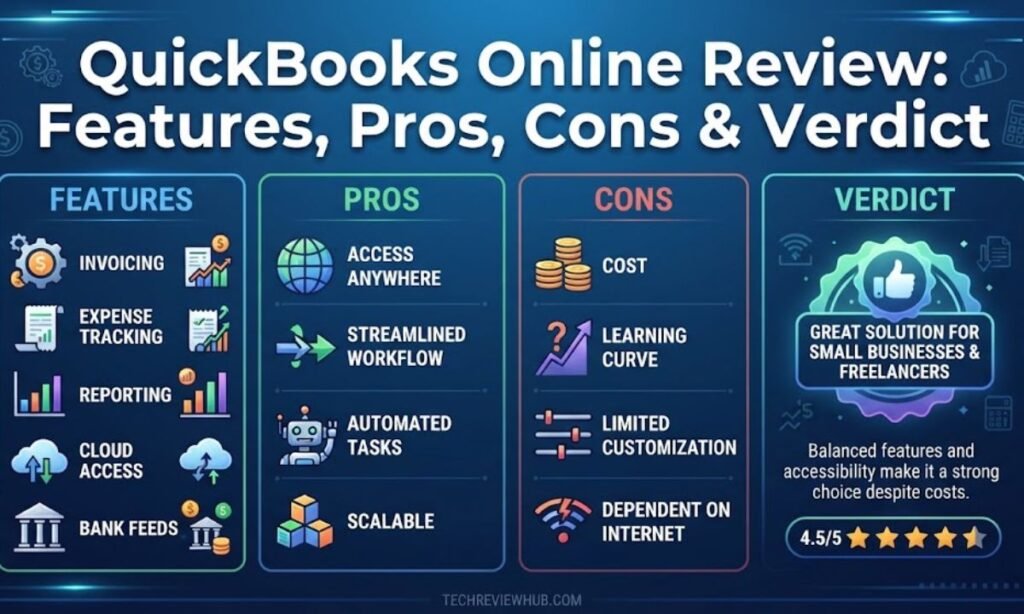

QuickBooks Online is Intuit’s cloud-based accounting platform for small and mid-sized businesses. It handles invoicing, expense tracking, payroll, and financial reporting from a browser or mobile app. This QuickBooks Online review looks at what the software actually does well, where it falls short, and who should pay for it.
Millions of businesses already run their books through QuickBooks Online, and most accountants know the platform by default. That familiarity is part of the appeal. But familiarity isn’t the same as value, especially after several rounds of price increases in the last few years.
Our quick verdict: QuickBooks Online remains one of the strongest all-in-one accounting tools on the market. It’s not the cheapest option, and the learning curve can frustrate first-time users. For businesses that need serious reporting and a bookkeeper who already knows the software, it’s still a solid pick.
Quick Verdict Summary of QuickBooks Online
| Category | Rating / Detail |
| Overall Rating | 7/10 |
| Who Can Use? | Small businesses with employees, inventory, or multiple bank accounts |
| Not Recommended For | Solo freelancers on a tight budget, teams needing unlimited free users |
| Work Quality | Strong reporting and reconciliation accuracy, occasional bank feed glitches |
| Ease of Use | Moderate. Simple for basic tasks, steeper curve for advanced reports |
| Final Verdict | A capable, well-supported platform, but budget for annual price hikes |
Disclosure: This review covers QuickBooks, an accounting software company, and its QuickBooks Online product. If you are looking for accounting software, you can use this review to understand its features, benefits, and limitations. If you want to test QuickBooks Online, explore its available options first; however, if you really do not need accounting software like QuickBooks, there may be no reason to purchase a paid plan. Please evaluate the service and its terms yourself before making a purchase.
What Is QuickBooks Online?
QuickBooks Online is a subscription-based accounting product built by Intuit. It runs entirely in the cloud, so there’s nothing to install on a local machine. Business owners use it to send invoices, log expenses, run payroll, and generate financial statements without hiring a full-time accounting team.
The platform sits apart from QuickBooks Desktop, which is installed software, and from QuickBooks Solopreneur, a stripped-down version aimed at side-gig workers. Intuit has been pushing users toward the online product for years now, and Desktop support is being phased out.
Key Details at a Glance
| Detail | Information |
| Website Name | QuickBooks Online (quickbooks.intuit.com) |
| Website Type | Cloud-based small business accounting software |
| Founded | QuickBooks launched in 1998; the Online version followed in 2001 |
| Content Focus | Invoicing, expense tracking, payroll, financial reporting |
| Free or Paid | Paid subscription, with a 30-day free trial |
| Registration Required | Yes, an Intuit account is required to sign up |
| Target Audience | Small business owners, bookkeepers, and accounting firms |
Who Should Use QuickBooks Online?
- Not ideal for: solo freelancers who only need to log a handful of transactions a month, teams that need more than five users without paying for the Advanced tier, businesses that can’t tolerate yearly price increases.
- Average for: businesses with employees or contractors, companies that need inventory tracking, anyone who already works with a QuickBooks-certified bookkeeper.
Information and Privacy Considerations for QuickBooks Online
QuickBooks Online may ask for certain information when you create an account, purchase a plan, or set up specific features. The information required can vary depending on the services and features you choose.
Some features, such as payroll or third-party integrations, may involve additional business or financial information. You should review what information a feature requires before using it and provide only what is necessary for that particular service.
When connecting another app or service, check its permissions and understand what information may be shared. Avoid providing unnecessary personal or financial details, especially when a feature does not require them.
Features of QuickBooks Online
QuickBooks Online packs a lot into one dashboard. Here’s how the core features actually hold up in daily use.
Invoicing and Payments
Every paid plan supports unlimited invoices. You can send them straight from the app, set up recurring billing, and accept online payments through QuickBooks Payments. Clients can pay by card or bank transfer directly from the invoice link.
Higher tiers add batch invoicing and automated payment reminders. That matters more once you’re sending dozens of invoices a month rather than three or four.
Expense Tracking
Bank and credit card feeds sync automatically once connected, pulling in transactions daily. The mobile app lets you snap a photo of a receipt and attach it to the matching transaction. Rules can auto-categorize recurring expenses, which saves real time at tax season.
Some long-term users report occasional feed disconnections that require manual reconnecting. It’s not constant, but it happens often enough to mention.
Reporting and Dashboards
This is where QuickBooks Online earns its reputation. The dashboard shows profit and loss, cash flow, and outstanding invoices at a glance. Reports can be customized, saved, and scheduled to email automatically.
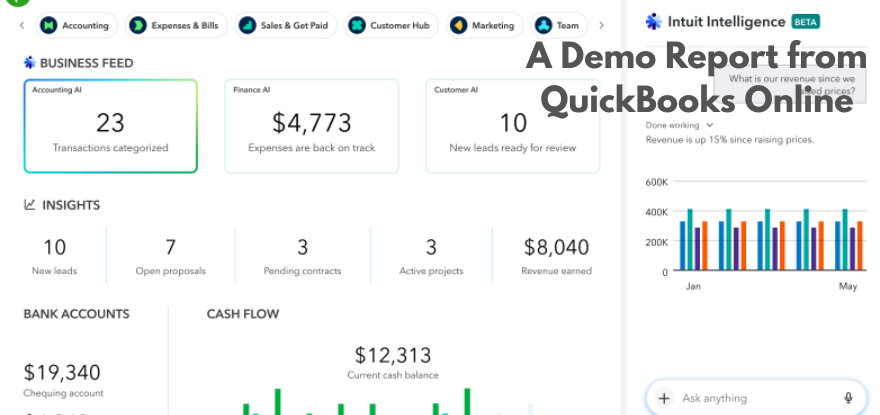
Advanced-tier users get extra tools, including custom KPI dashboards and deeper multi-entity reporting for businesses managing more than one company file.
Payroll and Integrations
Payroll isn’t included in the base subscription. It’s sold as an add-on, priced separately by employee count. QuickBooks Online Advanced now bundles Workforce Elite payroll and Bill Pay Elite at no extra fee, which narrows the gap for larger teams.
The App Store connects hundreds of third-party tools, covering payment processors, CRMs, e-commerce platforms, and time tracking apps. Most popular small business software has a QuickBooks integration built in.
Feature Comparison Table
| Feature | Simple Start | Essentials | Plus | Advanced |
| Users included | 1 | 3 | 5 | 25 |
| Bill management | Basic | Full | Full | Full |
| Inventory tracking | No | No | Yes | Yes |
| Project profitability | No | No | Yes | Yes |
| Custom user permissions | No | No | No | Yes |
| Bundled payroll add-on | No | No | No | Workforce Elite included |
Other Post AI Business Solutions Guide Review
User Experience of QuickBooks Online
Software can pack in every feature imaginable and still frustrate the people using it daily. QuickBooks Online mostly avoids that trap, though not perfectly. Here’s how the interface actually feels once you’re past the login screen.
Design & Navigation
The left-hand menu groups everything into familiar categories: banking, sales, expenses, and reports. New users can usually find invoicing and expense entry within a few minutes. Deeper features, like chart of accounts customization, take longer to locate.
Search works well for pulling up specific transactions or customers. The mobile app mirrors most desktop functions, though report customization is easier on a larger screen.
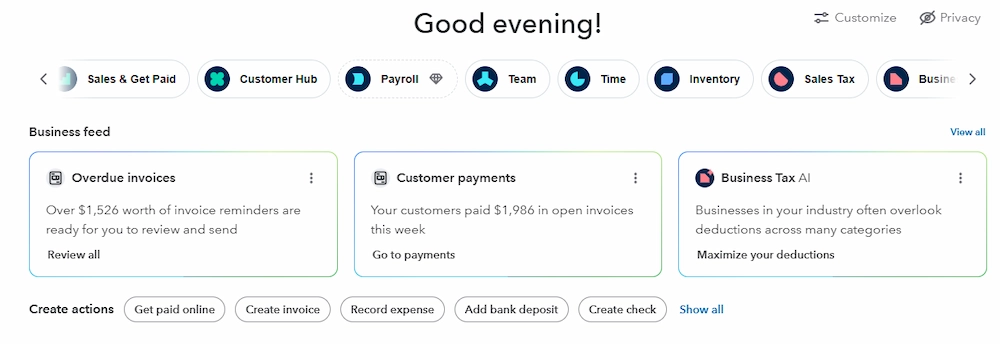
Intuit has rolled out AI-assisted features recently, including automated transaction categorization and conversational search. Some of these remain in beta, so results can be inconsistent depending on your account.
User Experience Score
| UX Factor | Score / 10 | Comment |
| Design | 7 | Clean layout, but frequent interface updates can throw off muscle memory |
| Navigation | 7 | Core tasks are easy to find, advanced settings less so |
| Learning Curve | 6 | Non-finance users often need a short onboarding period |
| Overall UX | 7 | Solid, functional, not the flashiest software on the market |
Work Quality of QuickBooks Online
A feature list only matters if the numbers behind it hold up. This section looks at how reliable QuickBooks Online really is once live transactions start flowing through it, not just what the marketing promises. Reconciliation accuracy and reporting consistency say more about a platform than any spec sheet.
Accuracy of Information
Bank reconciliation is generally reliable once feeds are connected correctly. Reports pull directly from live transaction data, so figures update in real time rather than on a delay. That said, formatting quirks and occasional data lag during heavy usage periods have been mentioned by reviewers on Capterra and G2.
Intuit updates the platform frequently, sometimes multiple times a quarter, which keeps the software current with tax rules and banking standards. It also means the interface doesn’t stay static for long.
Content Quality Score
| Quality Indicator | Score / 10 | Notes |
| Accuracy | 7 | Reliable reconciliation, minor sync issues reported occasionally |
| Depth | 8 | Covers invoicing through payroll in one platform |
| Originality | 7 | Feature set is broadly similar to top competitors |
| Usefulness | 7 | Genuinely useful for day-to-day bookkeeping, not just tax time |
How Good is QuickBooks
QuickBooks Online holds up well for what it promises. It’s not the cheapest tool on the market, and the yearly price hikes are a fair criticism, but the depth of reporting, the payroll options, and the sheer size of its accountant network make it hard to dismiss. Most complaints center on cost and occasional sync hiccups, not on whether the core accounting actually works.
For a business past the point of a spreadsheet but not yet ready for a full finance team, it does the job reliably. The current Free plan and the temporary 90% off promo lower the barrier to trying it out, which makes now a reasonable time to test whether it fits your workflow before committing to a paid tier long term.
Pricing of QuickBooks Online
| Plan | Standard Price | Users | Notes |
|---|---|---|---|
| Simple Start | $38/month | 1 | Access for 2 accountants |
| Essentials | $75/month | 3 | Access for 2 accountants |
| Plus | $115/month | 5 | Marked “Customer Favorite,” access for 2 accountants |
| Advanced | $275/month | 25 | Access for 3 accountants |
The Prices Mentioned above May Fluctuate Over Time
Pros of QuickBooks
- ✅ Combines invoicing, expenses, payroll, and reporting in a single subscription
- ✅ Enormous network of accountants and bookkeepers already trained on the platform
- ✅ Mobile app handles receipt capture and mileage tracking well
- ✅ Large third-party app marketplace for payments, CRM, and inventory tools
- ✅ Scales from a single-user plan up to a 25-user Advanced tier
Cons of QuickBooks
- ❌ Price increases have been steep and frequent, especially on Plus and Advanced
- ❌ User limits are tighter than competitors like Xero, which allows unlimited users
- ❌ Payroll costs extra on most plans instead of being bundled in
- ❌ Customer support response times vary depending on plan and time of day
- ❌ Occasional bank feed sync issues reported by long-term users
Tips Before Using QuickBooks Online
Signing up for QuickBooks Online takes about five minutes. Protecting your financial data and avoiding billing surprises later takes a bit more effort. These tips cover what to check before you commit, and what to keep an eye on after.
How to Verify Claims
- Check Intuit’s official pricing page for current rates before you subscribe
- Read recent reviews on Capterra or G2 instead of relying on the overall star average
- Run the 30-day free trial with your own transactions before committing to a plan
Safety Checklist
- Turn on two-factor authentication for every user on the account
- Give bookkeepers and accountants limited access instead of full admin rights
- Export a backup of your financial data on a regular schedule
- Review connected apps periodically and remove ones you no longer use
Alternatives to QuickBooks Online
Top 3 Alternatives
Xero is the closest direct competitor. It supports unlimited users on every plan, which suits growing teams that would otherwise pay for QuickBooks Advanced. Pricing runs from roughly $25 to $90 per month.
Wave fits very small or simple businesses that mainly need invoicing and basic bookkeeping. It’s free for core accounting, with add-ons like payroll priced separately.
FreshBooks leans toward freelancers and service-based businesses that bill by the hour. Its invoicing and time tracking are especially strong. Plans start around $23 per month.
Alternatives Comparison Table
| Software | Best For | Feature Depth | Ease of Switching from QBO | Pricing Transparency |
| Xero | Growing teams needing unlimited users | High | Moderate, data migration tools available | Clear, published pricing |
| Wave | Very small businesses, simple invoicing | Basic | Easy for simple books | Free core plan, add-ons billed separately |
| FreshBooks | Freelancers and service businesses | Moderate | Easy for invoice-heavy workflows | Clear, published pricing |
| QuickBooks Online | Small to mid-sized businesses with complex needs | High | N/A | Prices shift yearly, check before renewing |
The 5-Point Checklist for Vetting Any Accounting Software
- Confirm the real monthly cost. Add up the base plan, payroll, and any payment processing fees before comparing platforms.
- Check user and feature limits. Make sure the plan you’re considering actually supports your team size and workflow.
- Read recent reviews, not just the average score. Look for patterns in complaints from the last six months.
- Test the free trial with real data. A demo account never reveals the same friction points as your own transactions.
- Ask your accountant what they actually use. Compatibility with your bookkeeper often matters more than any single feature.
Other Post TheLifestyleEdge.com Review
Final Verdict
QuickBooks Online earns its reputation as one of the most complete accounting platforms for small businesses. It handles invoicing, expenses, payroll, and reporting without needing three separate tools. The learning curve is real, but the payoff shows up once your books are running smoothly.
The bigger question isn’t whether the software works. It’s whether the yearly price increases still make sense for your budget. If the reporting depth and accountant support justify the cost, QuickBooks Online remains a safe long-term choice.
Should You Use QuickBooks Online?
No, if you’re a solo freelancer who only needs basic invoicing, or if recurring price increases are a dealbreaker. In that case, Wave or FreshBooks may serve you better without the same long-term cost creep.
Yes, if you run a small or mid-sized business that needs solid reporting, multiple users, or payroll in one place. The learning curve is manageable, and the accountant network alone makes onboarding easier than most competitors.
Frequently Asked Questions (FAQ)
How much does QuickBooks Online cost in 2026?
Plans range from $38 per month for Simple Start up to $340 per month for Advanced, following the August 2026 price increase on Essentials, Plus, and Advanced.
Can I switch from QuickBooks Desktop to QuickBooks Online?
Yes. Intuit provides migration tools to move company files, and QuickBooks Desktop support is being phased out, so many users are switching regardless.
Does QuickBooks Online include payroll?
Not by default. Payroll is a paid add-on on Simple Start, Essentials, and Plus. Advanced now includes Workforce Elite payroll in the subscription price.
What’s the difference between QuickBooks Online and QuickBooks Solopreneur?
Solopreneur is a lighter, cheaper product for side-gig workers who mainly need to separate business and personal expenses. It lacks a customizable chart of accounts and other features found in Simple Start and above.
Is QuickBooks Online good for beginners?
Yes, for basic tasks like invoicing and expense tracking. Advanced reporting and custom setup take longer to learn, so budget time for onboarding.
Sources & References
Pricing figures in this review come directly from Intuit’s official QuickBooks Online plan comparison page and Intuit’s own pricing update announcement, covering the August 2026 rate changes. Additional pricing context and historical rate tracking were cross-checked against NerdWallet’s QuickBooks pricing guide.
User sentiment and reliability notes draw from verified reviews on Capterra’s QuickBooks Online page and G2’s QuickBooks Online comparison listings. Alternative software comparisons reference and NerdWallet’s Wave review for competitor pricing and feature accuracy.