

Business owners hear the phrase “AI business solutions” constantly, but the term covers wildly different tools. A chatbot that answers support tickets and a model that forecasts revenue both fall under that label. This guide breaks down what AI business solutions actually are, what they cost in 2026, and how to pick one without wasting a budget cycle on a tool that never gets adopted.
We built this as a practical framework rather than a rating of one specific product. Every pricing figure below comes from vendor pages or industry pricing guides published in 2026, and we note where numbers shift often. Use it to compare categories, not to take any single number as gospel six months from now.
Guide Summary
| Category | Detail |
| What This Guide Covers | Four core categories of AI business solutions, real pricing ranges, and a vetting process |
| Best For | Small and mid-size business owners evaluating their first AI tool purchase |
| Not Ideal For | Enterprise buyers who need a formal RFP or procurement-grade vendor audit |
| Typical Pricing Range | Free tiers up to several thousand dollars a month, depending on category and scale |
| Approach | Framework-based, sourced from 2026 vendor pricing pages and analyst research |
| Format | Comparison tables, evaluation checklists, and a phased rollout plan |
What Are AI Business Solutions?
AI business solutions are software products that use machine learning or generative AI to handle a business task that used to require a person doing manual work. That includes answering customer questions, qualifying sales leads, moving data between systems, and building reports. The category is broad on purpose, since vendors keep adding “AI” features to products that already existed.
Key Categories at a Glance
| Category | Primary Job | Typical Buyer |
| Customer Service AI | Resolve or triage support tickets and chats | Support and CX teams |
| Sales & Lead Gen AI | Find, score, and reach out to prospects | Sales development and marketing |
| Process Automation AI | Move data and trigger actions across apps | Operations and IT teams |
| Analytics & BI AI | Turn raw data into reports and forecasts | Finance, data, and leadership teams |
Who Should Use AI Business Solutions?
Not every business needs every category above, and buying too early is a common mistake.
- Good for: teams with a repetitive, high-volume task that already has a defined process to automate
- Good for: businesses with enough transaction or ticket volume to make usage-based pricing worthwhile
- Not ideal for: teams still figuring out their core workflow, since AI tends to speed up a bad process rather than fix it
- Not ideal for: businesses with no one to own the tool after the initial setup phase
The real benefit shows up when a tool removes a bottleneck a team already feels. A support desk drowning in repeat questions gets more from AI than one with a handful of tickets a week.
The 4 Core Types of AI Business Solutions
Customer Service and Support AI
Key Capabilities
- Automated ticket and chat resolution across email, chat, and voice
- Agent-assist features that draft replies or summarize long threads
- Escalation logic that hands off complex cases to a human
Free vs Paid Options
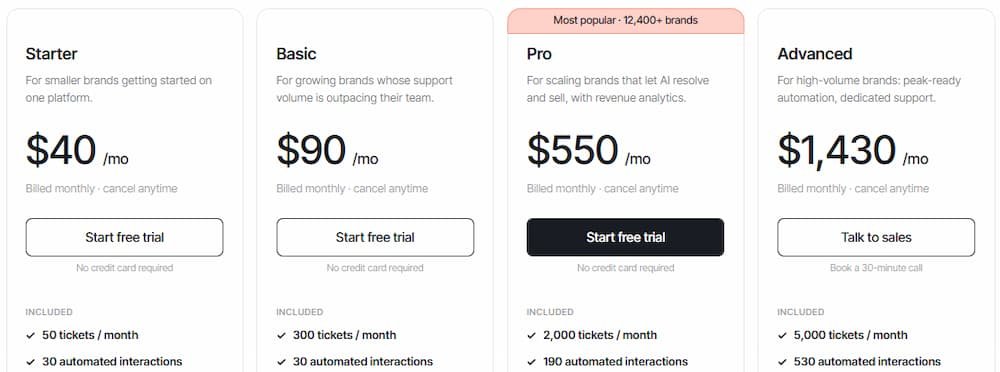
Freshdesk offers a genuinely free tier that includes its Freddy AI assistant for up to ten agents, which is unusual in this category. Most competitors charge based on usage rather than seats. Intercom’s Fin popularized per-resolution pricing, where a business pays only when the AI actually closes a conversation without a human. Zendesk layers AI resolution fees on top of its $55 to $169 per agent monthly suite plans, plus a separate AI add-on.
| Plan | Price | Features |
| Free | $0 | Freshdesk’s free tier includes basic Freddy AI for small teams (up to 10 agents) |
| Usage-Based | Roughly $0.40–$1.50 per ticket or resolution | Common model at Intercom Fin, Gorgias, and similar vendors, billed per handled conversation |
| Enterprise | $2–$4+ per resolution, or custom quote | Salesforce Agentforce and similar platforms, often requiring a base CRM subscription first |
The pricing mentioned above may change over time.
Sales and Lead Generation AI
Key Capabilities
- Prospect discovery and contact data enrichment
- AI-written outreach sequences and reply handling
- Predictive lead scoring based on intent signals
Free vs Paid Options
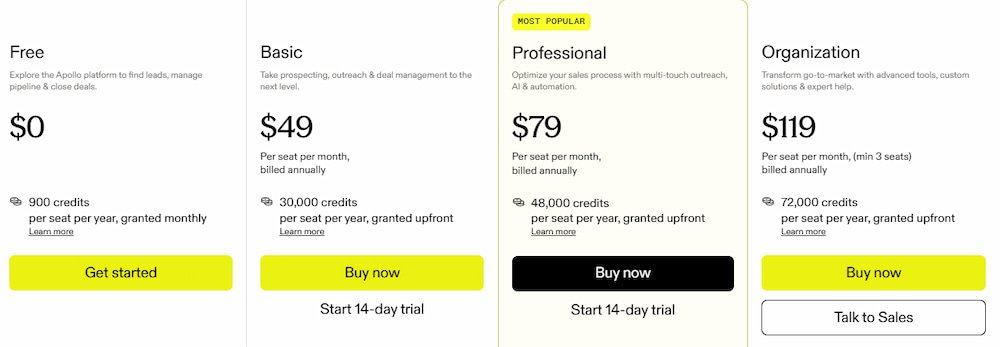
Apollo.io remains the most accessible entry point, with a working free plan and paid tiers starting around $49 per user monthly. HubSpot bundles AI sales features into Sales Hub starting near $7 per user monthly. At the other end, autonomous “AI SDR” platforms and full account-based marketing stacks routinely start in the low thousands of dollars per month, with some legacy ABM suites running past $30,000 a year.
| Plan | Price | Features |
| Free | $0 | Apollo.io free plan covers basic contact search and limited outreach volume |
| Growth | ~$7–$49 per user/month | HubSpot Sales Hub or Apollo paid tiers, covering enrichment and sequencing |
| Enterprise/Autonomous | Custom, often $1,000+/month | Full AI SDR platforms or ABM suites with dedicated onboarding |
The pricing mentioned above may change over time.
Operations and Process Automation AI
Key Capabilities
- Connecting apps so data moves automatically between them
- AI-assisted workflow building from plain-language descriptions
- Robotic process automation (RPA) for older, API-free software
Free vs Paid Options
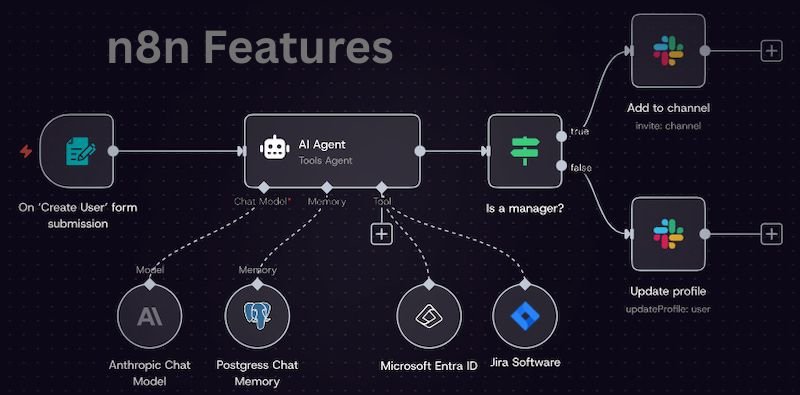
Zapier and n8n both offer functional free tiers, with n8n’s self-hosted community edition costing nothing to run. Paid plans typically start between $20 and $30 monthly for a small team. UiPath, aimed at legacy system automation, starts near $25 monthly for its basic plan but moves to custom enterprise pricing quickly at scale. The pricing mentioned below may change over time.
| Plan | Price | Features |
| Free | $0 | Zapier and n8n both offer usable free tiers for light, low-volume automation |
| Starter | ~$20–$30/month | Increased task or execution limits, more complex multi-step workflows |
| Enterprise/RPA | Custom quote | UiPath and similar platforms for legacy, UI-based system automation |
Data Analytics and Business Intelligence AI
Key Capabilities
- Natural-language queries against company data
- Automated report and dashboard generation
- Anomaly detection and plain-language trend summaries
Free vs Paid Options
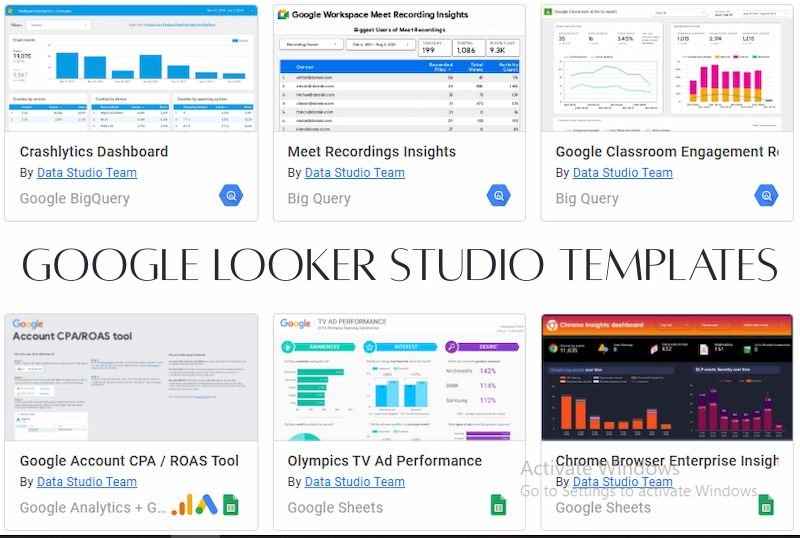
Power BI is the budget leader at roughly $14 per user monthly for its Pro tier, though its Copilot AI features require a separate Fabric capacity add-on that starts closer to $260 a month. Tableau’s Creator license runs about $75 per user monthly. Google’s Looker Studio remains free for basic use, while enterprise governance platforms like Looker can run into the tens of thousands annually.The pricing mentioned below may change over time.
| Plan | Price | Features |
| Free | $0 | Google Looker Studio covers basic visualization and reporting |
| Standard | ~$14–$75/user/month | Power BI Pro or Tableau Creator, core BI without full AI capacity |
| AI-Enabled/Enterprise | $260+/month (capacity-based) or custom | Copilot on Power BI Fabric, Tableau+ bundles, or enterprise Looker deployments |
If you are looking for an article structure ideas site review, TheLifestyleEdge.com Review
User Experience
Design & Navigation
Most AI business tools follow a similar pattern: a dashboard for setup, a separate area for the AI assistant or copilot, and usage or billing data tucked into account settings. The better products let you test the AI on real data before committing to a paid tier.
Watch for tools that hide their pricing model behind a sales call, since that often signals a more complex or expensive contract than the marketing page suggests.
What to Evaluate in a Trial
| UX Factor | What Good Looks Like | Red Flag |
| Onboarding | Guided setup, sample data included | Requires a sales call before you can try anything |
| Navigation | AI features integrated into existing workflow | AI bolted on as a separate, disconnected module |
| Pricing Clarity | Billing unit stated plainly on the pricing page | “Contact us” pricing with no published range |
| Mobile Access | Core functions usable on mobile | Desktop-only, no mobile support at all |
| Data Transparency | Clear log of what the AI did and why | Black-box outputs with no audit trail |
Features to Look For in AI Business Solutions
Capability Depth
Look past the headline “AI-powered” label and check what the AI actually does versus what still requires manual review. Some tools genuinely resolve a task end to end; others just draft something a human still has to approve.
Search & Filters
If you are comparing multiple vendors, filter by billing unit first (seat, resolution, credit, or session), since that single choice affects total cost more than any feature list.
Community & Support
Check whether the vendor has an active user community, changelog, or status page. Tools with visible release notes tend to be more transparent about what is genuinely new versus rebranded.
Evaluating Vendor Claims and Marketing Content
Accuracy of Vendor Information
Vendor pages tend to lead with best-case numbers. A resolution rate or ROI figure quoted on a homepage is usually the top result from one customer, not a typical outcome. Ask for a reference customer close to your size and industry before trusting a published stat.
Depth vs. Surface-Level Marketing
Thin vendor content repeats the same three benefits on every page. Deeper vendors publish real pricing, technical documentation, and limitations, not just success stories.
Original Data vs. Recycled Claims
Some AI vendors run their own research and publish it with named sources. Others recycle the same analyst statistic across a dozen competing blog posts. The presence of a named, dated source is a decent signal of effort.
Vendor Transparency Checklist
| Signal | Why It Matters | Where to Check |
| Published pricing | Avoids surprise enterprise quotes later | Vendor pricing page |
| Named case studies | Confirms real customers, not composites | Customer stories page |
| Clear billing unit | Prevents cost surprises at scale | Pricing FAQ or terms |
| Security/compliance docs | Matters for any tool touching customer data | Trust or security center |
| Recent changelog | Shows active development, not abandonware | Product blog or release notes |
Pros
- ✅ Genuine time savings on repetitive, high-volume tasks like ticket triage and data entry
- ✅ Usage-based pricing in several categories means you can start small and prove value before scaling spend
- ✅ Faster reporting and forecasting once analytics AI is connected to clean data
- ✅ Many categories now offer real free tiers, lowering the cost of testing before buying
- ✅ Vendor competition has pushed pricing transparency, making it easier to compare options than it was two years ago
Cons
- ❌ Usage-based billing can spike unpredictably as AI resolution rates improve and usage climbs
- ❌ Enterprise-grade AI features are frequently gated behind separate, expensive add-ons
- ❌ Marketing claims about resolution rates or ROI often reflect best-case customers, not typical results
- ❌ Poor underlying data quality undermines analytics AI regardless of how good the model is
- ❌ Legacy system automation (RPA) still requires real technical setup time despite “no-code” marketing
Tips Before Using AI Business Solutions Safely
Buying an AI tool without a verification step is how businesses end up with surprise bills or tools nobody uses after month two.
How to Verify Vendor Claims
- Ask for a reference customer in your industry and company size range
- Request the exact billing unit and a worst-case cost estimate at your expected volume
- Test the tool on your own messy data, not the vendor’s demo dataset
Safety & Procurement Checklist
- Confirm where your data is stored and whether it trains the vendor’s models
- Check for a documented data deletion and export process
- Get the cancellation terms in writing before the trial ends
How to Evaluate and Choose AI Business Solutions
Buying an AI tool works best when you start from the problem, not the product demo.
Define the Problem Before Selecting the Tool
Write down the specific task costing your team the most time or money. A vague goal like “use more AI” leads to buying a tool that solves a problem you do not actually have.
What Business Leaders Are Saying
Adoption data backs up the mixed picture. McKinsey’s State of AI survey found that most organizations now use AI in at least one business function, yet only a minority describe their deployment as fully scaled beyond pilots. Gartner has separately projected that a large share of agentic AI projects will be shelved by 2027, usually over unclear return on investment or weak governance. PwC’s 2026 CEO survey found only a small fraction of chief executives reporting both cost savings and revenue gains from AI at once. The pattern across these reports is consistent: adoption is nearly universal, proof of value is not.
Key Evaluation Criteria
- Does the tool solve a task you already do manually and often?
- Is the pricing model aligned with how you would actually use it?
- Does it integrate with the systems you already run?
- Can you measure success in a concrete, numeric way?
The 5-Point Checklist for Vetting Any AI Tool
- Confirm the billing unit and get a real cost estimate at your volume
- Request a reference customer similar to your business
- Run a trial on your own data, not a sample dataset
- Check data handling, storage, and deletion policies
- Identify who internally will own the tool after setup
Implementing A Phased Approach
Phase 1: Assessment (Weeks 1–4)
Map the specific workflow you plan to automate and document current time and cost. Shortlist two or three vendors that match your budget and billing preference.
Phase 2: Pilot (Weeks 5–16)
Run the tool on a limited scope, such as one team or one ticket category, and track results against your Phase 1 baseline. Involve the people who will use it daily, not just leadership.
Phase 3: Scale (Months 4–12)
Expand to additional teams or use cases only after the pilot shows a measurable improvement. Revisit pricing at each scaling step, since usage-based costs grow with adoption.
Final Verdict
Framework Summary
| Category | Takeaway |
| Customer Service AI | Best free-tier access; usage-based pricing rewards high resolution rates |
| Sales AI | Low-cost entry with Apollo/HubSpot; enterprise AI SDRs cost significantly more |
| Process Automation | Zapier and n8n offer the most accessible free tiers |
| Analytics AI | Power BI is the cheapest entry; real AI features often cost extra |
Should You Use AI Business Solutions?
If you have a defined, repetitive workflow and the volume to justify usage-based pricing, yes, start with a pilot in the category that matches your biggest bottleneck. If your processes are still undefined or nobody owns the tool after purchase, wait and fix the process first. AI business solutions amplify whatever workflow you already have, for better or worse.
Sources & References
Pricing and feature details referenced in this guide were drawn from vendor pricing pages and 2026 industry pricing comparisons, including coverage from Zapier, n8n, HubSpot, Apollo.io, and BI vendor comparison sites.
Adoption statistics referenced come from McKinsey’s State of AI survey, Gartner’s 2026 agentic AI research, and PwC’s 2026 CEO Survey. Pricing changes frequently in this market; confirm current numbers directly with each vendor before purchasing.
Frequently Asked Questions (FAQ)
Are AI business solutions worth it for a small business?
Often yes, if the task being automated is repetitive and high-volume. A low ticket or lead volume may not justify usage-based pricing yet.
What is the cheapest way to start with AI business solutions?
Use the free tiers already available in most categories, such as Freshdesk’s Freddy AI, Apollo’s free plan, or Zapier and n8n’s free automation tiers.
What’s the ROI of integrating AI into supply chain management?
Most companies see 15–20% cost savings, but real ROI usually takes 2–4 years, not months.
How to implement AI solutions in retail businesses?
Start with one high-volume task (inventory forecasting or customer service), pilot it for 8–16 weeks, then scale based on measured results.
What are the best AI tools for small business marketing?
Canva AI and Jasper for content, ChatGPT for brainstorming, and HubSpot AI or Semrush AI Toolkit for combined CRM/SEO work.
How can AI improve customer service operations?
It resolves repetitive tickets automatically and drafts replies for agents, cutting response time while humans handle complex cases.
Best AI business solutions for small to medium enterprises?
Freshdesk (support), Apollo.io (sales), Zapier or n8n (automation), and Power BI (analytics) — all have real free or low-cost tiers.
How long does it take to see results from an AI business tool?
Most businesses can evaluate a pilot within 8 to 16 weeks, based on a defined baseline and a limited-scope rollout.