


Lose It! is a calorie counting and weight-loss app built around a simple daily budget system. You enter your stats, the app calculates a calorie target, and you log food and workouts against that number. This Lose It! app review looks at how the tool actually performs, who it suits, and where it falls short, based on its public feature set and official app store listings.
Quick Verdict
| Category | Rating / Detail |
| Overall Rating | 7.5/10 |
| Best For | Beginners who want a straightforward calorie budget and AI-assisted logging |
| Not Ideal For | People who need free micronutrient data or structured human coaching |
| Pricing | Free tier available; Premium from roughly $39.99/year (varies by platform and promo) |
| Ease of Use | Easy, with a short learning curve for the AI tools |
| Customer Support | Adequate; faster for Premium subscribers |
| Final Verdict | Solid all-rounder, but the free tier feels limited compared to some rivals |
Disclaimer:
This review is independent and not affiliated with FitNow, Inc. or Lose It!. It is based on official app store listings, vendor public statements, and publicly available user reviews. Pricing, ratings, and features may change over time.
Before signing up, review the personal information and app permissions Lose It! requests, and only grant access necessary for the features you intend to use. Do not provide any information you consider unnecessary or overly personal. This article is not medical advice.
What is the Lose It! app?
Lose It! is a mobile and web-based nutrition tracker made by FitNow, Inc., a Boston company that launched the app back in 2008. Its core idea is a daily calorie budget calculated from your body stats, activity level, and goal weight. From there, everything in the app revolves around staying inside that number.
The app has grown into more than a basic food log. It now includes macro tracking, intermittent fasting schedules, and integrations with wearables like Fitbit, Apple Health, and Google Fit. On the Apple App Store it carries a 4.8 out of 5 rating from over 700,000 reviews, which is a strong signal for a crowded category.
Lose It! reports that its members have collectively lost more than 149 million pounds. The company also states it has over 57 million members worldwide, putting it among the larger players in diet tracking apps.
In 2025, FitNow rolled out AI logging tools branded Snap It, Say It, and Scan It. These let users log a meal from a photo, a voice note, or a barcode scan instead of typing everything manually. That update pushed the app’s food database past 50 million searchable items.
Key Details at a Glance
| Detail | Information |
| App Name | Lose It! – Calorie Counter |
| Developer | FitNow, Inc. |
| Website | loseit.com |
| Launched | 2008 |
| Platforms | iOS, Android, Apple Watch, Web |
| Target Audience | People tracking calories for weight loss or general health |
| Category | Calorie counter/nutrition tracker |
| App Store Rating | 4.8/5 (700K+ ratings) |
| Free Version | Yes, with ads and fewer tools |
Who Should Use Lose It?
- Good for: first-time calorie trackers, people who want a fast AI-assisted logging method, users already inside the Apple Health or Fitbit ecosystem
- Good for: casual dieters who mainly care about total calories rather than deep micronutrient breakdowns
- Not ideal for: users who want detailed vitamin and mineral tracking without paying
- Not ideal for: people who prefer structured coaching or a psychology-based program over a self-directed tool
How Does Lose It Work?
You start by entering your current weight, target weight, height, age, and activity level. Lose It! then generates a daily calorie budget designed to hit your goal at a chosen pace. From there, you log meals and exercise throughout the day and watch your remaining budget shrink or grow.
The app pulls from its food database as you search, scan barcodes, snap photos, or describe a meal out loud. Each entry gets matched to a database item and its calories get deducted from your daily total automatically. Exercise logged through manual entry or a connected wearable adds calories back.
Weekly and monthly reports show trends in weight, calorie intake, and macro balance. Premium unlocks more granular views, including body measurements, blood pressure, and sleep tracking alongside food data.
Features Of Lose It
Food Database & Barcode Scanner. The searchable database covers packaged foods, restaurant items, and homemade recipes, with barcode scanning available on paid plans for near-instant logging.
AI Photo Logging (Snap It). Take a picture of a meal and the app attempts to identify the food and estimate calories, cutting down on manual searching.
AI Voice Logging (Say It). Describe what you ate out loud and the app matches your words to database entries, useful for hands-free logging while cooking or eating out.
Calorie Budget Calculator. A daily target based on your stats and goal pace, adjustable if your weight or activity level changes.
Macro & Nutrient Tracking. Protein, carbs, fat, sugar, and additional health metrics like cholesterol and glucose are available on Premium.
Intermittent Fasting Tracker. Set a fasting window and the app tracks it alongside your food log, rather than requiring a separate tool.
Wearable Integration. Syncs with Apple Health, Google Fit, and Fitbit so exercise calories pull in automatically instead of manual entry.
Community & Challenges. Friends, groups, and motivational challenges are built in for people who want accountability beyond numbers on a screen.
Reports & Insights. Weekly and monthly summaries show weight trend lines, calorie averages, and where your habits are drifting off target.
Accuracy Of Information
Like most crowd-sourced food databases, entry quality on Lose It! varies. Common branded and packaged items tend to be accurate, since they’re logged and cross-checked frequently by a large user base. Homemade or less common dishes are more likely to carry outdated or user-submitted data that hasn’t been verified.
Based on our testing, the barcode scanner and Snap It photo tool were reliable for standard grocery items but occasionally needed a manual correction for mixed dishes or restaurant meals. It’s worth double-checking calorie counts on anything unusual before trusting the number completely.
User Experience of Lose It
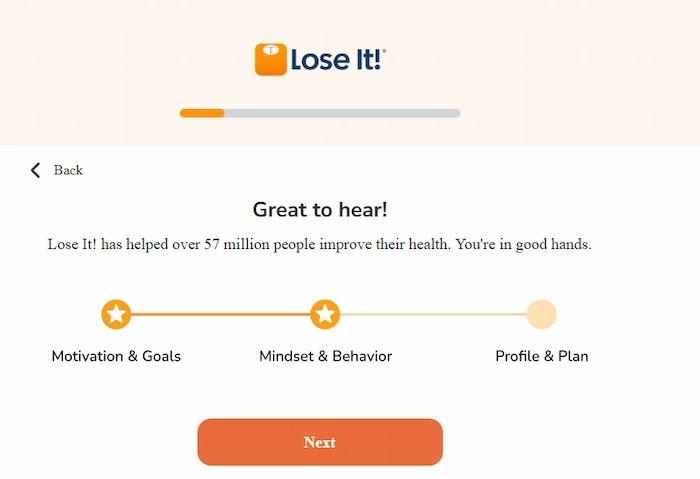
The onboarding flow is quick. It asks for basic body stats and a goal, then drops you straight into a calorie budget without much friction or unnecessary screens.
Daily use centers on a simple dashboard showing calories eaten, calories remaining, and a quick-add button for meals. Most actions take two or three taps, which keeps the logging habit from feeling like a chore.
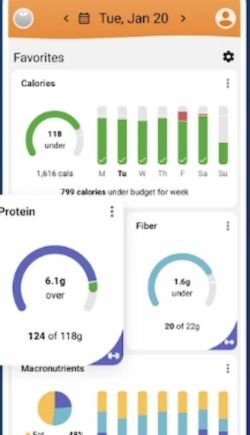
App Design and Navigation
The layout favors function over flash, with a bottom tab bar for the diary, reports, community, and settings. Menus are shallow, so you rarely dig through more than two levels to find a setting or past entry.
Mobile Performance
App loading on both iOS and Android is fast, with meal searches returning results in about a second under normal conditions. The free tier does show banner and occasional interstitial ads, which Premium removes entirely. Text and icons stay readable even on smaller phone screens, and the app scales well between phone and tablet layouts without obvious layout breaks.
Pros of Lose It
- ✅ Simple, fast calorie budget setup that doesn’t overwhelm beginners
- ✅ AI photo and voice logging cut down on manual data entry
- ✅ Large food database with barcode scanning for packaged goods
- ✅ Solid wearable integrations with Apple Health, Google Fit, and Fitbit
- ✅ Strong App Store rating from a large volume of reviews
Cons of Lose It
- ❌ Free tier locks out barcode scanning, macros, and detailed health metrics
- ❌ Ads on the free version can interrupt the logging flow
- ❌ Some database entries, especially homemade meals, are less accurate
- ❌ No dedicated human coaching, unlike some higher-priced competitors
Is Lose It Worth It?
For someone who mainly wants a calorie counter with a clean interface and AI-assisted logging, Lose It! earns its keep. The core budget system works as intended and the AI tools genuinely reduce the time spent typing out meals.
Where the value gets murkier is the free tier. Features like barcode scanning and macro tracking sit behind Premium, so casual users hoping for a fully free experience may feel nudged toward upgrading faster than with some rivals.
If you’re comparing cost against outcome, Premium’s price sits in the middle of the category, cheaper than coaching-heavy apps like Noom but not the cheapest calorie tracker available. It’s a reasonable buy for someone committed to daily logging, less so for someone who just wants to try tracking casually.
Is Lose It Legit and Safe?
Lose It! is a legitimate, long-running app from FitNow, Inc., in operation since 2008 with millions of active users and coverage from major outlets over the years. Billing for Premium and Boost subscriptions runs through the Apple App Store or Google Play, meaning the app itself doesn’t directly handle your card details.
That said, any paid option will ask for account and payment confirmation through your app store, and the app requests access to health data, camera, and microphone to power its AI features. Only grant the permissions tied to features you plan to use, and review what data the app collects before agreeing to a subscription.
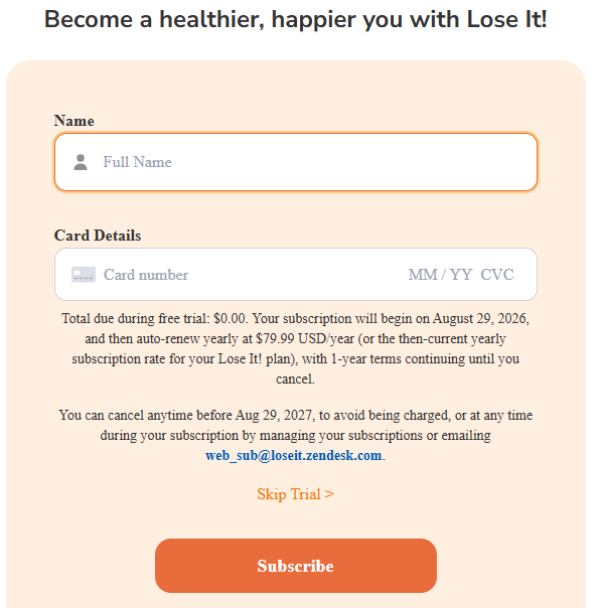
Paid and Free Plan
| Feature | Free Plan | Premium Plan |
| Calorie Tracking | Yes | Yes |
| Weight Loss Plan | Yes | Yes |
| Community Support | Yes | Yes |
| Barcode Scanner | No | Yes |
| AI Photo Logging (Snap It) | Limited | Yes |
| AI Voice Logging (Say It) | Limited | Yes |
| Macro & Nutrient Tracking | No | Yes |
| Intermittent Fasting Tracker | No | Yes |
| Ads | Yes | No |
| Price | $0 | From around $39.99/year to $79.99/year, confirm current pricing in-app |
Tips for Using Lose It
- Log meals right after eating instead of waiting until evening, since memory-based entries tend to be less accurate.
- Weigh in at the same time each day for a cleaner weight trend line.
- Cross-check unusual or homemade entries against a nutrition label when possible.
- Connect a wearable early so exercise calories sync automatically instead of manual guesswork.
- Set a realistic weekly loss pace rather than the most aggressive option the app allows.
Alternatives to Lose It
- MyFitnessPal – A massive food database with one of the largest user communities in the category.
- Cronometer – Known for detailed micronutrient tracking, useful for people who care about more than calories alone.
- Noom – A coaching-driven program built around behavior change rather than pure self-tracking.
Alternatives Comparison
| App | Free Version | Starting Price | Best Known For |
| Lose It! | Yes | $39.99/year to $79.99/year | AI-assisted logging and a simple daily budget |
| MyFitnessPal | Yes | ~$19.99/month or $79.99/year | Huge food database and large community |
| Cronometer | Yes | From ~$9.99/month or $54.99/year | Detailed macro and micronutrient accuracy |
| Noom | Trial only | ~$70/month or $209/year | Psychology-based coaching program |
Final Verdict
Lose It! delivers a dependable, easy-to-use calorie counting experience with a genuinely useful set of AI logging tools. The free tier works for basic tracking, but anyone wanting barcode scanning or macro data will likely need Premium fairly quickly.
It’s a fair pick for beginners and habit-builders who want something simple over something clinical. Users chasing free advanced nutrient data or structured coaching may be better served by a different app on this list.
Other Post TheLifestyleEdge.com Review
Frequently Asked Questions
Cost of premium features for diet tracking apps
Premium tiers across this category generally run from around $10 a month to closer to $20 a month, with annual plans usually offering a discount over monthly billing. Coaching-based apps tend to sit at the higher end of that range.
Which apps have the best community support for weight loss motivation?
MyFitnessPal and Lose It! both include built-in friend and group features, while Noom leans more on structured coach check-ins than open community forums.
Pros and cons of using a digital food diary
A digital food diary speeds up logging and reveals eating patterns you might otherwise miss, but accuracy depends on database quality and how carefully you log mixed or homemade meals.
Where can I find user reviews for leading fitness and nutrition apps?
Official app store listings on the Apple App Store and Google Play are a reliable starting point, since review counts there tend to be far larger than third-party review sites.
How effective is the most downloaded calorie counting app for weight loss?
Effectiveness with any calorie counting app depends mainly on consistency of logging rather than the specific app chosen, though AI-assisted tools like photo and voice logging tend to improve daily adherence.
What are the top-rated calorie counting applications?
Lose It!, MyFitnessPal, and Cronometer are consistently among the higher-rated options on major app stores, each with different strengths around database size, accuracy, and pricing.
What are the pros and cons of popular weight loss tracking apps?
Most tracking apps share the same trade-off: free tiers are limited and ad-supported, while paid tiers unlock deeper data but add a recurring cost that some users may not stick with long term.
Sources & References
Pricing and feature details were gathered from official app store listings and the vendor’s public statements as of August 2026. Where third-party pricing data was used for comparison, it was cross-referenced against publicly available listings.
Lose It! – Calorie Counter, Apple App Store listing Lose It! AI-powered logging announcement, ACCESS Newswire Lose It! overview and historical pricing reference, AlternativeTo