

Most marketing analytics tools hand you a wall of numbers and expect you to connect the dots yourself. Funnelytics takes a different approach. It puts your customer journey on a visual canvas first, then layers real data on top of that map.
That sounds appealing on paper. The question is whether the execution matches the pitch, and whether the pricing makes sense once the free trial ends.
This Funnelytics review walks through what the platform actually does, where it shines, and where a marketer might hit friction. We looked at the vendor’s own site, verified reviewer feedback on G2 and Capterra, and compared the plans against a few common alternatives.
Quick Verdict Summary of Funnelytics
| Category | Rating / Detail |
| Overall Rating | 4.5 out of 5 (aggregated from G2 and Capterra) |
| Best For | Marketers and agencies who need to visualize and forecast funnels |
| Starting Price | Map Pro from $39/month; Performance plans from $129/month |
| Free Trial | Yes, 7 days on Map Pro and 14 days on Performance plans |
| Ease of Use | Strong for mapping; steeper for pixel-based tracking setup |
| Standout Feature | Drag-and-drop visual canvas connected to live data |
| Main Drawback | Pricing climbs quickly once you need real tracking, not just maps |
What Is Funnelytics?
Funnelytics is a visual customer journey mapping and analytics platform built for marketers, agencies, and ecommerce teams. In this Funnelytics review, we tested it as a tool for planning funnels on a canvas and then overlaying real traffic, conversion, and revenue data on that same map.
The platform is organized around three layers. You map the journey with drag-and-drop icons, forecast what traffic and conversion rates could produce before you spend a dollar on ads, then switch on live analytics once the campaign is running.
It started as a funnel-mapping tool for course creators and agencies. It has since grown into a broader journey analytics product, with a separate branch called Funnelytics Ecom built specifically for Shopify brands tracking lifetime value.
Key Details at a Glance
| Detail | Information |
| Company | Funnelytics Inc. |
| Founded by | Mikael Dia |
| Headquarters | Canada |
| Product type | Cloud-based SaaS, web browser access |
| Core plans | Map Pro, Performance Pro, Performance Business |
| Related product | Funnelytics Ecom (Shopify-focused) |
| Integrations | Zapier, Webhooks, Google Tag Manager, Meta, Google Ads, HubSpot, GoHighLevel, Shopify |
| Free version | Free trial only; no permanent free plan as of our check |
Who Should Use Funnelytics?
Ideal for:
- Marketing agencies presenting funnel strategy to clients visually
- Course creators and coaches mapping lead-to-sale journeys
- Marketing strategists who want to forecast profit before launching a campaign
- Shopify brands wanting to see which paths produce the highest lifetime value customers
Maybe a bad fit for:
- Solo founders on a tight budget who only need basic Google Analytics reporting
- Teams that already have a mature attribution stack and just need dashboards
- Businesses without a marketer or strategist to actually build and read the maps
- Anyone expecting deep ecommerce inventory or product analytics out of the box
Information and Privacy Considerations for Funnelytics
Funnelytics collects visitor-level data through a tracking pixel or Google Tag Manager, similar to most web analytics tools. That includes traffic sources, pages viewed, and on-site actions like form fills or button clicks once you connect the relevant plan.
Before rolling it out, check your own cookie consent setup and confirm the tracking method fits your region’s privacy rules. The vendor publishes its privacy policy and a data processing agreement on its site, and reviewing those directly is the safest way to confirm current terms, since policies change over time.
Impressive Things About Funnelytics
- ✅ The drag-and-drop canvas makes funnel logic easy to explain to non-technical stakeholders
- ✅ Forecasting lets you model expected traffic and revenue before spending on ads
- ✅ Reviewers on G2 and Capterra consistently mention a smooth onboarding experience with clear tutorials
- ✅ Templates give agencies and strategists a fast starting point instead of a blank canvas
- ✅ Vision AI, available on the Business plan, surfaces where a funnel is leaking without manual digging
- ✅ Works well as a client-facing deliverable, not just an internal dashboard
In Which Things It Falls Short
- ❌ Value-for-money scores from verified reviewers sit lower than other rating categories, around 3.7 out of 5 on Capterra
- ❌ Performance-tier tracking setup requires comfort with Google Tag Manager, which adds a technical step for smaller teams
- ❌ Some reviewers note it doesn’t go as deep as dedicated tools like Google Analytics for ecommerce segmentation
- ❌ Pricing has shifted multiple times over the past couple of years, which makes long-term budgeting harder
- ❌ The free option is trial-only now rather than a permanent free tier
Features of Funnelytics
- Visual funnel canvas — Map out every step of a customer journey with drag-and-drop icons for pages, ads, emails, and forms.
- Forecasting — Simulate traffic, conversion rate, and revenue outcomes before a campaign goes live.
- Live performance overlay — See actual conversion and drop-off numbers laid directly onto the map you built.
- Vision AI — An assistant on the Business plan that flags funnel gaps and suggests where to focus next.
- Funnel template library — Over 100 pre-built funnel layouts to start from instead of an empty canvas.
- Multi-domain tracking — Automatically tracks sources, pages, videos, and buttons across more than one domain.
- CRM and ad integrations — Connects with HubSpot, GoHighLevel, Meta, and Google Ads for cost and pipeline data.
- Funnelytics Ecom — A dedicated LTV and journey view built for Shopify stores.
Feature Comparison Table
| Feature | Map Pro | Performance Pro | Performance Business |
| Drag-and-drop canvas | ✅ | ✅ | ✅ |
| Funnel templates | ✅ | ✅ | ✅ |
| Forecasting simulator | ✅ | ✅ | ✅ |
| Live traffic and source tracking | ❌ | ✅ | ✅ |
| Form and calendar tracking | ❌ | ✅ | ✅ |
| Purchase and deal tracking | ❌ | ❌ | ✅ |
| Vision AI insights | ❌ | ❌ | ✅ |
| Ad account cost/profit sync | ❌ | ❌ | ✅ |
User Experience of Funnelytics
Based on our testing and on aggregated reviewer feedback, the canvas itself is genuinely pleasant to use. Dragging elements around feels closer to a design tool than a typical analytics dashboard, which is part of why agencies like using it in client calls.
| Rating Source | What It Measures | Score |
| Capterra | Ease of Use | 4.0 / 5 |
| Capterra | Customer Support | 4.1 / 5 |
| Capterra | Overall Satisfaction | 4.4 / 5 |
| G2 | Overall Rating | 4.2 / 5 |
Design & Navigation
The main canvas view is clean, with a simple sidebar for dragging in icons and a top bar for switching between the map, forecast, and live analytics layers. Toggling between those three modes is one of the more intuitive parts of the interface.
Where new users tend to slow down is the tracking setup, particularly when it involves Google Tag Manager on the Performance plans. That part isn’t a design flaw exactly, but it does break the otherwise smooth flow of the tool.
Work Quality of Funnelytics
Accuracy of Information
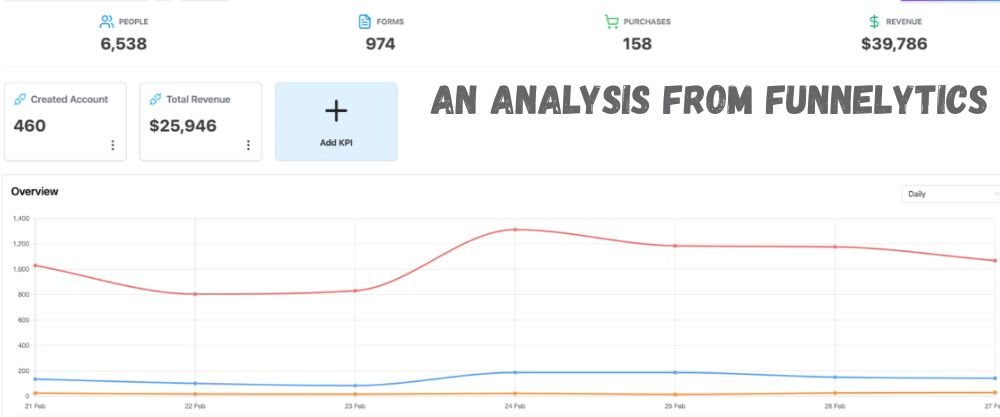
Like any pixel-based analytics tool, Funnelytics’ tracking accuracy depends on factors outside its control, including ad blockers, browser privacy settings, and platform-level tracking limits such as iOS App Tracking Transparency. This is a shared limitation across the analytics category, not something unique to Funnelytics.
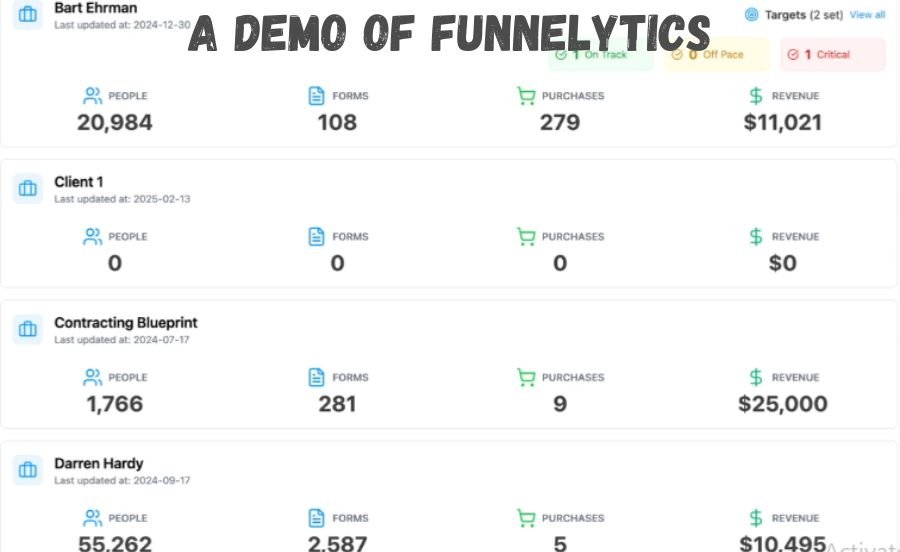
What the platform does well is present that data in a way that’s easy to sanity-check. Because everything sits on a visual map, spotting an unusual drop-off or a spike is faster than scanning a spreadsheet export.
Work Quality by Category
| Category | Assessment |
| Tracking accuracy | Comparable to other pixel-based tools; standard web-tracking limitations apply |
| Visualization clarity | Strong; one of the platform’s clearest advantages |
| Forecast reliability | Useful for planning, best treated as an estimate rather than a guarantee |
| Insight actionability | Good on Business plan with Vision AI; more manual on lower tiers |
Pricing of Funnelytics
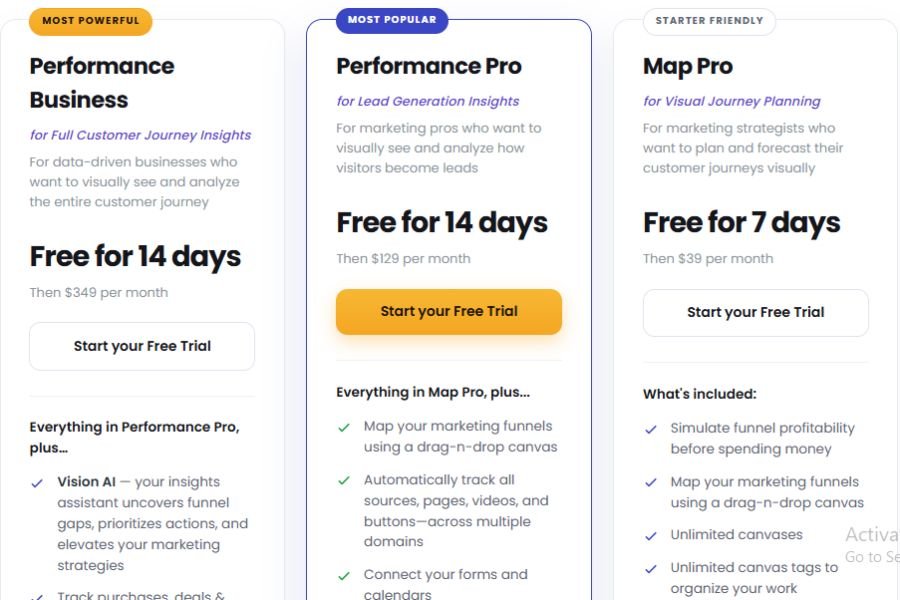
Funnelytics currently runs three core plans for its Journeys product, priced by feature set rather than by traffic volume on the lower tiers. All plans come with a free trial and no credit card required to start, according to the vendor’s site.
| Plan | Price | Best For |
| Map Pro | $39/month (7-day free trial) | Strategists who mainly need mapping and forecasting |
| Performance Pro | $129/month (14-day free trial) | Marketers tracking how visitors become leads |
| Performance Business | $349/month (14-day free trial) | Businesses tracking the full purchase and deal journey |
Pricing has changed more than once over the past couple of years, moving through different tier names and price points. Treat the numbers above as accurate as of my research and always confirm current pricing on the official Funnelytics pricing page before committing.
Tips Before Using Funnelytics
How to Verify Claims
Before you commit to a paid plan, run the free trial with a real campaign rather than test data. Compare what Funnelytics reports against your existing Google Analytics or Shopify numbers to see how closely the two align.
Ask the sales team directly about data retention limits and what happens to your maps if you downgrade. Vendor claims around forecasting accuracy are estimates, so validate them against your own historical conversion rates instead of taking them at face value.
Safety Checklist
- Confirm your cookie consent banner covers the Funnelytics tracking pixel
- Check the current data processing agreement before connecting customer data
- Test on one funnel before rolling it out account-wide
- Set a calendar reminder before your trial converts to a paid plan
- Export your canvas templates periodically as a backup
Alternatives to Funnelytics
No single tool wins every category. Here are three alternatives worth comparing depending on what you actually need.
HubSpot Marketing Hub — A broader marketing and CRM platform with built-in analytics. It costs less to start, but reporting depth is generally lighter than a dedicated visual mapping tool, and costs rise fast as your contact list grows.
Hotjar — Strong for heatmaps and session recordings that show how visitors behave on a single page. It doesn’t offer funnel mapping or forecasting the way Funnelytics does, so the two solve different problems.
Triple Whale — Built specifically for Shopify and ecommerce attribution. It’s a closer match to Funnelytics Ecom than to the core Journeys product, with a free plan and paid tiers that scale up based on store revenue and feature needs.
Alternatives Comparison Table
| Tool | Starting Price | Best For | Funnel Mapping? |
| Funnelytics | $39/month | Visual journey mapping and forecasting | Yes |
| HubSpot Marketing Hub | From $20/month | All-in-one marketing and CRM | No |
| Hotjar | From roughly $32/month | Heatmaps and session recordings | No |
| Triple Whale | Free plan; paid tiers vary | Shopify attribution and LTV | No |
Other Post: ErikkaPost com Overview
The 5-Point Checklist for Vetting Any Marketing Analytics Software
- Does it track the specific actions your business cares about, not just pageviews?
- Can you export your data if you decide to switch tools later?
- Does the pricing model scale predictably as your traffic grows?
- Is there a real human support option, not just a help center?
- Does the trial let you test with live data before you pay?
Final Verdict
Funnelytics does what it sets out to do. It turns a marketing funnel into something a whole team can look at and understand in seconds, and the forecasting layer adds real planning value most analytics tools skip entirely.
The tradeoff is cost and setup effort once you move past basic mapping into live tracking. Smaller teams on a tight budget may find the value-for-money gap that reviewers flag on Capterra to be a real sticking point.
Should You Use Funnelytics?
If you run an agency, coach clients, or need to justify ad spend visually before a campaign launches, it earns its price. If you just need standard web analytics and already have a reporting stack, a cheaper or more general tool likely covers your needs just as well.
Frequently Asked Questions
Is Funnelytics worth the price?
For agencies and strategists who present funnels visually or forecast campaigns before spending, most reviewers say yes. For basic tracking needs, cheaper tools may cover it.
Does Funnelytics have a free plan?
As of our check, Funnelytics offers a free trial rather than a permanent free tier. Confirm current terms on the official pricing page.
How hard is Funnelytics to set up?
Mapping is drag-and-drop and simple. Live tracking on Performance plans involves Google Tag Manager, which adds a technical step for non-technical users.
Can Funnelytics replace Google Analytics?
Not fully. It’s stronger for visual funnel planning and forecasting, while Google Analytics still covers deeper site-wide reporting and segmentation.
Does Funnelytics work for Shopify stores?
Yes, through Funnelytics Ecom, which focuses on lifetime value and journey data built for Shopify brands specifically.
Sources & References
Pricing and feature details in this Funnelytics review were taken from the official website as of September 2026, along with the following sources: